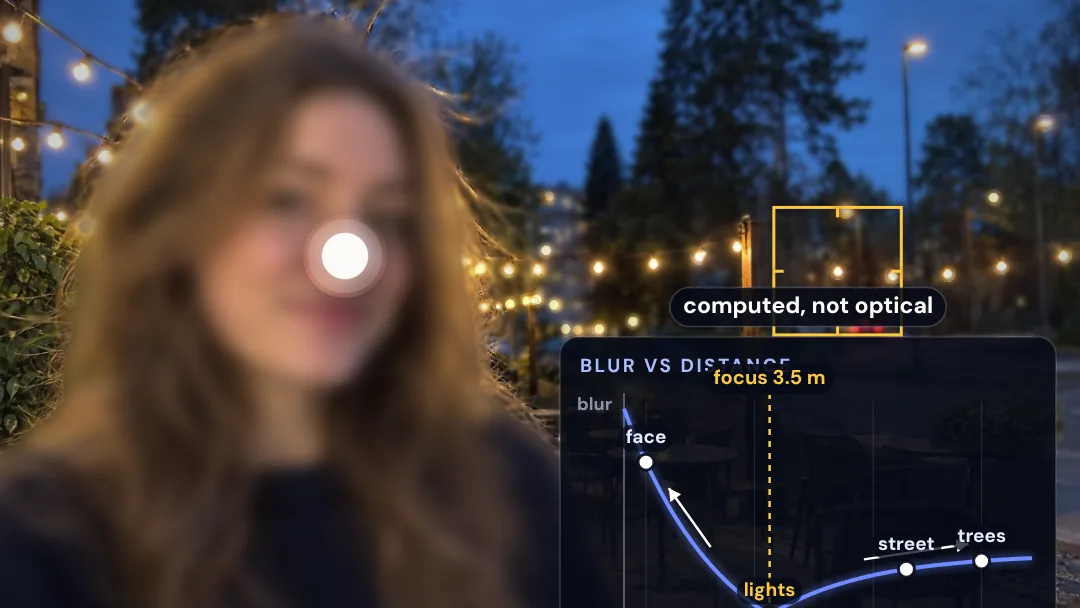
A phone’s tiny lens keeps almost everything sharp, from the front of the scene to the back. Yet Portrait Mode gives you a creamy, blurred background. Much of that blur is added by software, using a map of distances.
Try it yourself in Portrait Mode Lab: tap the photo to move the focus point and watch each part blur by its distance.
Why does a phone need to fake it?
Background blur from optics depends on the width of the lens opening. A 50-millimeter lens at f/1.8 opens 28 millimeters wide. A phone’s main lens is only about 6 to 7 millimeters long, so at f/1.8 it opens about 3.5 millimeters wide. That blurs roughly eight times less, which is why phone photos look sharp from front to back.
How does the phone know what is near?
The phone estimates a depth map: how far away each part of the picture is. Phones get depth from two cameras working as a pair, from dual-pixel autofocus sensors, from lidar on some models, and from neural networks that find people and estimate depth.
In the model, the depth map is gray, with white for near and black for far. Gray is turned into distance using anchors chosen for the scene: her face at 1 meter, the string lights at 3.5 meters, the street at 14 meters and the trees at 30 meters.
How is the blur applied?
Software blurs each part of the picture according to its distance from the chosen focus distance. The model uses a thin-lens rule: the blur radius grows with the difference in inverse distance, r = R · (2.8 / N) · |1/d − 1/d_focus|. Here R is 24 pixels of a 1,600-pixel-wide photo per 1/m at the f/2.8 look, and N is the f-number on the depth slider, from f/1.4 to f/16.
Software often shapes bright lights into lens-like discs. The model pre-blurs the image at several levels and blends the two levels around each pixel’s blur.
Predict first, then try
Before you tap, predict which parts of the scene will stay sharp if the focus point moves from her face to the trees. Then check it in Portrait Mode Lab. Watch the street and the string lights as the focus point moves.
Next, look at the edges of the hair. Hair strands are thinner than one pixel of a coarse depth map, so some strands are blurred as if they were background, and some background inside the edge stays sharp. Explain to yourself why that gives the trick away.
What does the model leave out?
The model’s tag reads “blur set by a depth map.” It leaves out much of what a real phone does:
- Real rendering. Real phones use more careful rendering, edge refinement and noise matching, and their exact methods are not public.
- Layers. The model treats her as one layer at 1 meter, cut out by the depth map, and fills the background behind her with a smooth guess.
- Resolution. The phone-like depth map is used at one sixth of the photo’s resolution, because phone depth maps are much coarser than the photo.
The photo and its depth map are AI-generated illustrations. The depth map is an AI estimate of that photo. All blur and every number come from the model.
Sources: Google Research, Portrait mode on the Pixel 2 and Pixel 2 XL smartphones; Wadhwa et al. (2018), Synthetic Depth-of-Field with a Single-Camera Mobile Phone, ACM Transactions on Graphics; Wikipedia, Depth of field; Wikipedia, 35 mm equivalent focal length; Wikipedia, Bokeh.
Sources & further reading
Make the next question an experiment.
Browse independent creators who make big ideas visible.
Find an explainer