Next to the router, your phone gets the top speed. One room over, it can be a fraction of that, while still showing Wi-Fi. What do the walls do to the signal?
Try it yourself in Wi-Fi Walls: add drywall, brick and concrete between the router and the phone, and watch the link speed step down.
How much does a wall take?
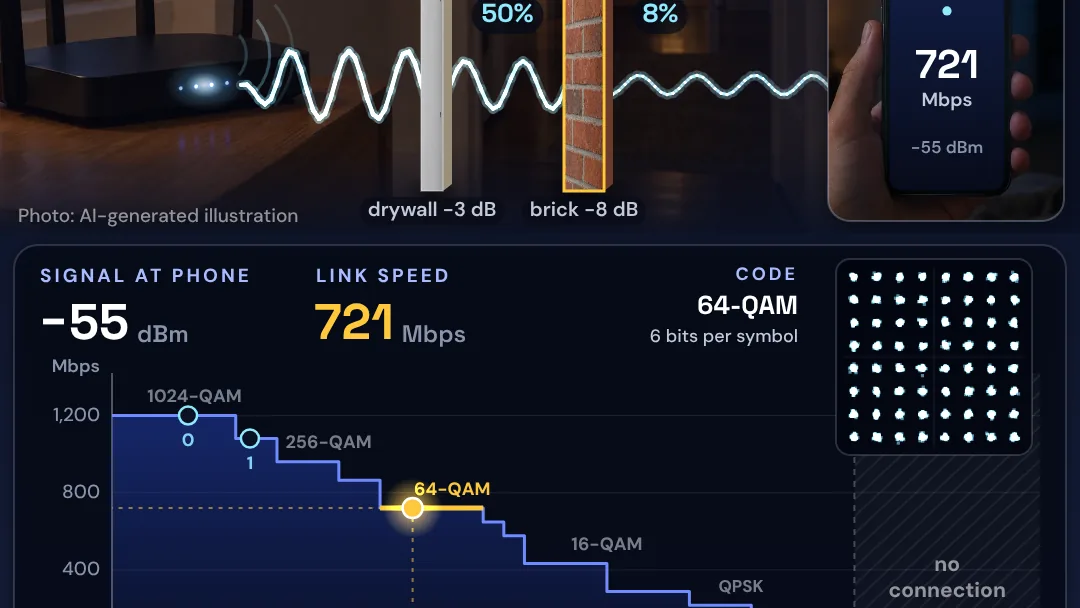
Wi-Fi is radio, and every wall soaks some of it up. Drywall takes about half. Brick and concrete take far more, and one concrete wall can cut the signal to a tenth or less. In the model, drywall costs 3 decibels, which lets about half the power through. Brick costs 8 decibels, about one sixth. Concrete costs 15 decibels, about one thirtieth.
Every 10 decibels is a factor of 10 in power, so a wall of 10 decibels or more lets through a tenth or less.
Where does the signal start?
The router sends 20 dBm, about 100 milliwatts with its antenna gain included, on a 5 GHz channel 80 MHz wide. The phone is 7 meters away. Free-space loss at that distance is 63.7 decibels, so with nothing in the way the phone receives minus 43.7 dBm.
Why do the steps come one at a time?
Router and phone use the fastest modulation and coding scheme the signal supports, and step down as it weakens. Denser codes carry more bits per symbol but need a cleaner signal, so a weak signal forces a slower, sturdier code.
The thresholds are the spec’s minimum receiver sensitivities for an 80 MHz channel, from minus 46 dBm for the densest code down to minus 76 dBm for the sturdiest. The speeds are the Wi-Fi 6 data rates for two spatial streams.
In the model, drywall takes the link from 1,201 to 1,081 Mbps. Brick takes it to 721 Mbps, and concrete to 216 Mbps, at minus 69.7 dBm. That is still 6 decibels above the floor. Below minus 76 dBm, the model shows no connection.
Predict first, then try
Before you add a wall, predict whether one concrete wall will leave the link near its top speed or drop it a long way. Then add walls in Wi-Fi Walls one at a time and watch each step arrive.
Explain to yourself why the speed drops well before the connection breaks. The steps happen because the signal is still strong enough for a slower code, even as it fades.
What does the model leave out?
The model’s tag reads “straight path, no reflections.” It is a simple link budget, and it leaves out:
- Reflections. Real signals also bounce through doorways and around rooms.
- Other networks. Interference from other networks, the angle at which the signal crosses a wall, and the 2.4 and 6 GHz bands are not modeled.
- Throughput. Link speed is not download speed. Protocol overhead means real throughput is lower, roughly 70 percent of the link rate by a common rule of thumb.
- Phones. Real phones usually beat the spec’s minimum sensitivities by several decibels, so their steps come at weaker signals, but in the same order.
The photos are AI-generated illustrations. Every number drawn on them comes from the model. In the film, a wall slides in and adds its loss gradually, so the steps show one by one.
Sources: Wikipedia, Free-space path loss; NHS England, Wireless infrastructure building guidance: building factors to consider; Stone, NIST, Electromagnetic Signal Attenuation in Construction Materials (NISTIR 6055, 1997); IEEE 802.11 TGax, spec text for 11ax receiver requirements; Wikipedia, Wi-Fi 6; Cisco, 802.11ac wireless throughput testing and expectations; Wikipedia, Link adaptation.

Sources & further reading
- Wikipedia, Free-space path loss
- NHS England, Wireless infrastructure building guidance: building factors to consider
- Stone, NIST, Electromagnetic Signal Attenuation in Construction Materials (NISTIR 6055, 1997)
- IEEE 802.11 TGax, spec text for 11ax receiver requirements
- Wikipedia, Wi-Fi 6
- Cisco, 802.11ac wireless throughput testing and expectations
- Wikipedia, Link adaptation
Make the next question an experiment.
Browse independent creators who make big ideas visible.
Find an explainer